Loading
YourNews, a student-designed mobile news app concept for semi-literate populations in India featuring color-coded categories, photo-driven stories, and social sharing.
Who to Listen ToActionGroup SecuritySomething Bigger
tech
674 wordsneutral tone
On surveying a host of news
sources, it seems apparent that the UI for many existing news websites is oftentimes cluttered and overwhelming, particularly for our target audience in mind: less-literate
people in India with access to low-level technology looking for a quick, digestible
news source.
The NY Times mobile app, for
example, is a cluttered and complicated. Similarly, below is the web UI for The Times of India, one of the most popular
news sources in India.
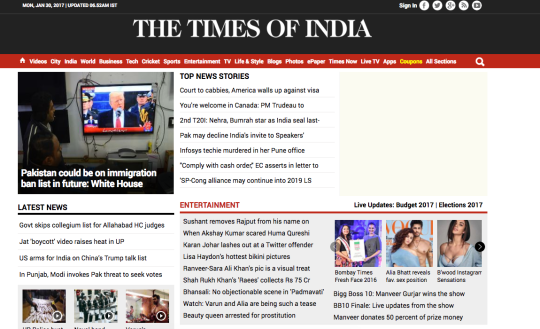
It’s clunky and difficult to glean with a quick glance. The various sections aren’t clearly labeled; there seems to be too much text that could just be overwhelming to our audience in mind; and simply put, the design is a bit boring.
As such, in considering main
elements for this mockup, I identified the primary UX pain-points for our
target audience as:
- Complex
vocabulary
- Superfluous
details: all content should be easy digestible
- Too much clutter:
for this low-tech app, there shouldn’t be too much “clutter” to distract and
overwhelm the user (see the Times of India homepage above for an example of
what could be confusing)
My app idea for an easily
digestible, low-tech news app is called YourNews, an app with simple UI that
will have color-coded, easy-to-read news about important topics in 5 key
“categories”.
To begin with the simple
home screen:
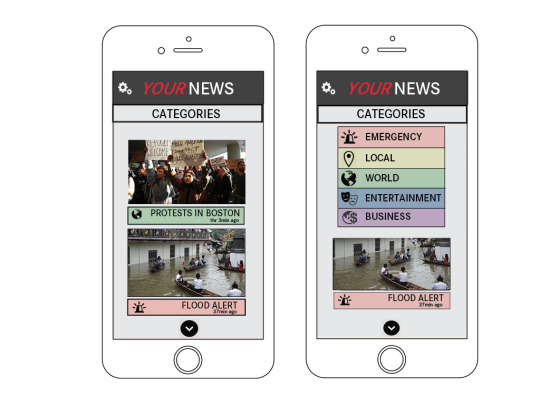
The default home screen has
a “news feed” of stories, each of which
consists of a photo and a pithy headline. This makes it very simple to click on
stories of interest. An important thing to note is that everything is
color-coded to correspond to one of the 5 key categories. This makes everything
easy and streamlined, and for perhaps the less literate readers, makes clear
the greater picture of the story.
Everything is color-coded to
correspond with one of five main categories: Emergency (red); Local (yellow); World
(green); Entertainment (blue); and Business (purple).
One interaction to note is
the “Sections” tab at the top, which upon clicking will reveal the 5 categories.
Users can click on a specific section to then display stories in just that
section. So if the just wants to read the latest Local news, they simply need
to click on Sections, then Local, and their “news feed” will switch to only
Local stories. Simple, easy, and organized!
CONTENT PAGES
Upon clicking on a specific
story (done so by either clicking the story headline or the corresponding photo
from the original “news feed”), the UI would look like this:
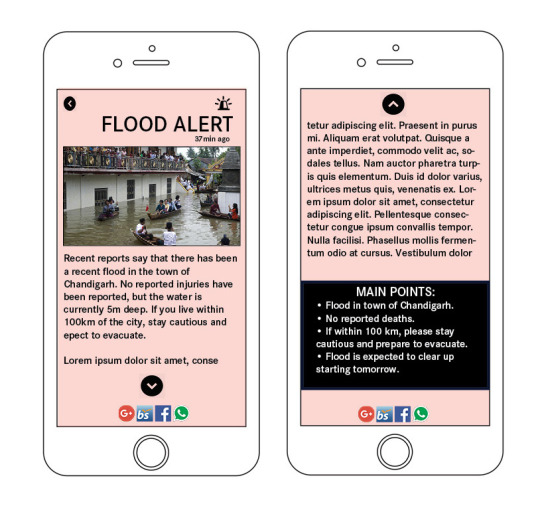
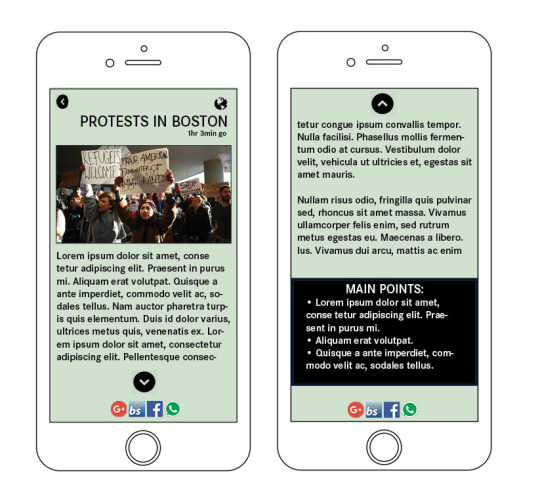
Key things to note with these pages:
- The same image
from the “news feed” now rests at the top with the same headline. This is to
keep things simple and repetitive—which is key because we are designing for
perhaps a less literate population. Simplicity
is key! - The background
color, once again, represents which of the 5 sections this story falls into. - A back arrow
(top left) will go back to the main “news feed.” - An up & down
arrow will appear to indicate that there is more of the story to read. - A “Main Points”
box is at the end of the story, listing the key takeaways that the reader
should know. This is important if users don’t want to spend the time reading
through the entire story, especially if it might take them a while. - 4 social media
sharing icons on the bottom—for Google+, BharatStudent, Facebook, and WhatsApp.
These are the 4 most popular social media websites in India, and this will be a
key strategic way of engaging the users and attracting new ones.
And a few additional notes on
strategy:
- The very simple
design of the app is crucial because it allows not only for easier usage
by our audience, but also allows for less data usage—similar to
Facebook Lite, which is a low-technology version of the classic Facebook app that uses
minimal storage and data. - The use of various social media “Share” buttons on every story (for the 4 most popular site) will be
one key way in which new members can discover the app.